Create a shortcut for the programs you use most often, so you can quickly launch them from the Favorites menu.
📍 Step 1: Select a program
- From the home screen, tap on “Programs” to access the full list of treatment cycles available in your cabinet.
- Select the program you want to add to favorites (e.g., Drying, Disinfection, Depollution, etc.) along with its duration.
📍 Step 2: Add to favorites
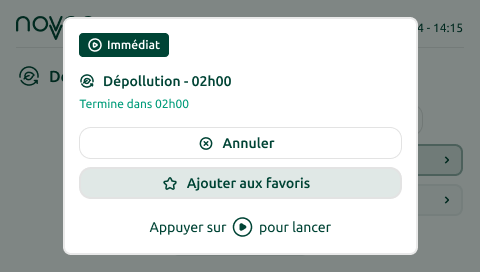
- After selecting the duration, and before starting the treatment, the screen displays a summary of your selection.
- Select the “Add to favorites” button and confirm.
- Once confirmed, the favorite star ⭐ will appear next to the program name.
Start a favorite program
- From the home screen, select “Favorites.” Use the up arrow 🔼 to cycle through your favorite programs.
- Choose your favorite program, then confirm to start the cycle.
ℹ️ Good to know
- You can add up to 4 programs to your favorites.
- To remove a program from your favorites, simply repeat the steps above and select “remove from favorites.”