You’ve just received your Novven 3S cabinet – here’s how to ensure proper depalletizing.
✅ Before you begin
Make sure you have the following items:
- A pair of protective gloves
- A safety cutter or strapping pliers
- A Phillips screwdriver
- Two people for handling (recommended)
📦 Depalletizing Procedure
- Visual inspection
- Check the color of the shock indicator – the circle inside the arrow must be GREEN.
- Also inspect the condition of the package and the pallet (no shocks, moisture, deformation, etc.).
- If you notice any issue, take photos and contact customer service before continuing.
- Removing external protections
- Carefully cut the straps or plastic wrap.
- Remove the foam corners, side protections, or cardboard.
- Check the condition of the screen and the door handle.
- Attaching the descent ramps
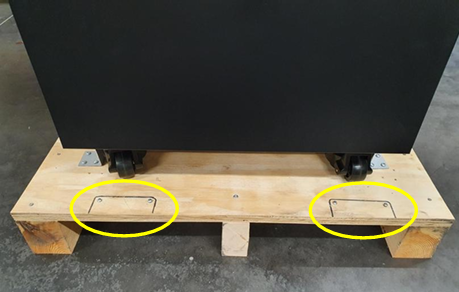
- Using a screwdriver, unscrew the 4 screws (fixed to the pallet) which will be used to attach the 2 descent ramps.
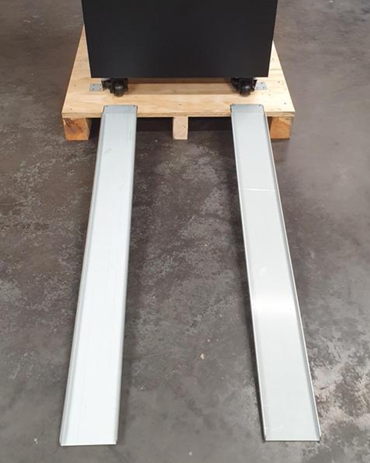
- Screw in the 2 ramps to ease the descent from the pallet.
Make sure to align the ramps correctly so the spacing matches the distance between the wheels.
4. Unlock the cabinet
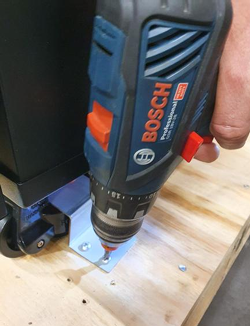
- Unscrew the screws holding the 4 metal plates that lock the 4 wheels.
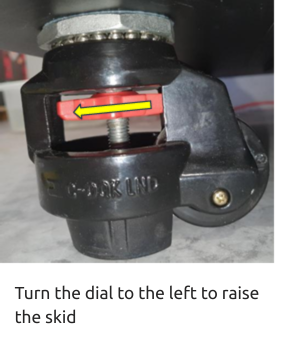
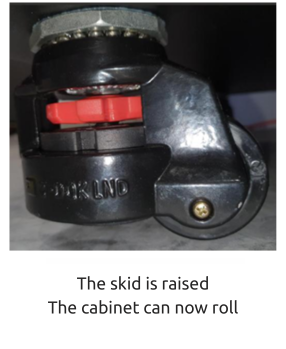
- Turn the red wheel dial to the left to raise the skid, so the cabinet rests on its wheels (rather than on its skids as set up for transport).
- Raise the skids as high as possible (to the maximum).
5. Lowering the cabinet
- Align the first two wheels with the descent ramps.
- Carefully guide the cabinet as it rolls down.
6. Storing the ramps
- Unscrew the 4 screws to remove the two metal ramps.
- Keep them together with the pallet.
7. Internal unpacking of the cabinet
- Open the cabinet door. Inside a box placed inside the cabinet, you will find:
- The activated carbon filter
- The power cord
- The water retention tray
- Accessories specific to your cabinet
- Also remember to remove any fasteners from the grilles and pre-installed accessories inside the cabinet.
🧾 Please note
- Do not discard the packaging right away: it may be useful for a possible return or for temporary storage.
- Keep the user manual and any technical documents that came with the unit.
🔄 Next step: